


4 politico News
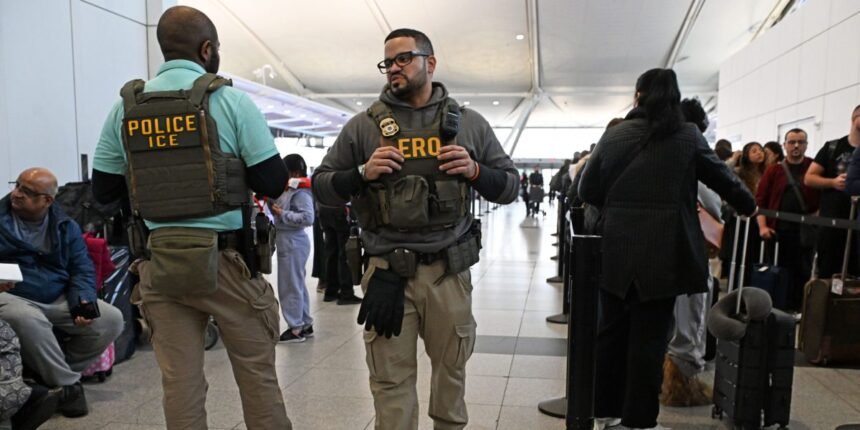
With Immigration and Customs Enforcement agents deployed to more than a dozen airports across the U.S. and border device searches growing increasingly common, it’s more important than ever to consider your digital security before you travel.
The risks are real. Customs and Border Protection agents have the authority to examine travelers’ devices. In June, for instance, federal agents denied a Norwegian tourist entry to the U.S. after looking through his phone. (Authorities claim they turned him away for admitted drug use; he says it was over a meme depicting Vice President JD Vance as a bald baby.)
Immigration and Customs Enforcement have already started targeting travelers, with agents in plain clothes forcefully detaining a mother in front of her young daughter at San Francisco International Airport on Sunday after a tip from the Transportation Security Administration.
If you’re flying, take these steps to reduce the likelihood that your sensitive information is compromised at the airport.
Don’t Bring Your Usual Devices
The only surefire way to keep your devices from being searched and seized is to simply not bring them with you on your trip. If you can’t leave them at home, consider mailing them to and from your destination.
Another option is to leave devices that contain sensitive information at home and instead bring throwaway travel devices you’re willing to have searched or confiscated. This doesn’t need to be an expensive proposition. You can reformat and repurpose an old phone or tablet, or purchase refurbished older models that are comparatively cheap. Then buy a temporary SIM card or eSIM so that you’re not using your usual number. Remember to let contacts know that for the duration of your trip you’ll be reachable at a different number.
Create a travel account for these devices. You can do so by starting a fresh account in the App Store or Google Play. This should ensure that if you’re forced to log into your device by authorities at the airport, the only information they’ll find is data you’ve put on this specific piece of hardware. CBP agents are supposed to only be able to look at data that’s local on the phone.
If you have anything sensitive in your accounts (say, emails from confidential sources) or anything you believe federal agents could consider damning (such as party pics or memes), be sure not to sync your apps, files, and settings onto your travel devices.
Disable Biometrics and Power Off
Regardless of whether you opt to bring your usual devices or specialized travel burners, take these steps to lock down your devices.
First and foremost, disable any biometrics, like using your face or fingerprint, to unlock your phone. Instead, set up a unique and random alphanumeric passcode; eight characters consisting of random digits and numbers is a good start. Be cautious of entering your passcode in open view of surveillance cameras. Use one hand to shield your screen and the thumb of your other hand to put in your passcode. Consider using privacy screens on your devices to further diminish the chance of wandering eyes noticing things that are none of their business.
Be cautious of entering your passcode in open view of surveillance cameras.
That means you’ll need to obtain paper copies of boarding passes, rather than rely on digital versions stored in a device wallet or via your airline’s app.
If you’re asked to unlock your devices, you can say “no.” But doing so may result in being delayed and hassled, and your device could be confiscated. You should receive paperwork attesting to the confiscation and establishing chain of custody (this is called CBP Form 6051D, or a custody receipt for detained property). As the Electronic Frontier Foundation points out, it may be months before your devices are returned — or even for an indefinite period of time if agents believe there is evidence of a crime.
Delete Files and Log Out
To practice what’s known in security circles as “defense in depth,” it’s best to think of your digital security as an onion: If an outer layer is peeled off, you want there to be a good second layer to minimize the damage to the core. To that end, assume that even if you have a strong passphrase and have powered off your device, someone may still be able to find a way in. Your travel devices should, therefore, minimize the amount of sensitive information they store. In that case, even if someone manages to break through the outer layer, the information exposed would be trivial.
If you use a password manager — a specialized app that securely stores your passwords — put it into a “travel mode,” limiting the passwords it will reveal for the duration of your trip. Remove access to sensitive accounts that you very likely won’t have a reason to need to access during your travels; for example, removing your work email if you’re going on vacation, or leaving and deleting sensitive Signal chats, like local ICE watch groups.
Log out of or delete apps you won’t need while traveling. You can reinstall and log back in when you are safely away from the airport. Remember to remove them once again when you’re on your way back — and keep in mind that this may lead to some apps deleting your history.
Finally, be sure to prune your contacts to remove any that are sensitive, such as sources, if you’re a journalist. If you have sensitive materials on your devices that you’ll need to access during your travels, use a tool like Cryptomator to encrypt them and upload them to a cloud drive, then delete the files from your devices. You can download them when you reach your destination.
These extra steps are undoubtedly a bit of a pain, but any inconvenience would pale in comparison to the potential damage if sensitive information is disclosed during your time in the airport.